

Security at PBXflex
Every call, text and fax stays with your business.
Patients and clients trust your team with personal details by phone, text and fax. PBXflex keeps those conversations on your business numbers and inside your organization. Here is how, in plain language.
- Conversations belong to your organization
- Credentials for every extension
- We don't sell personal information
When someone leaves, the conversations stay
Texting patients and clients from a personal phone is common. It also means the conversation leaves when the person does. On PBXflex, every number, text thread and fax belongs to your organization, not to one person.
Texting from personal phones
- Patients and clients have a staff member's own number.
- Their texts reach that person after hours, on a personal phone.
- Nobody else can see the thread or pick it up.
- The history leaves with that person.
Texting on PBXflex
- Patients and clients text your business number.
- When the desk is closed, an away message tells them when to expect an answer.
- Threads live in a shared inbox the team works from.
- Remove someone who leaves, and the history stays with you.
Who can get in, and how
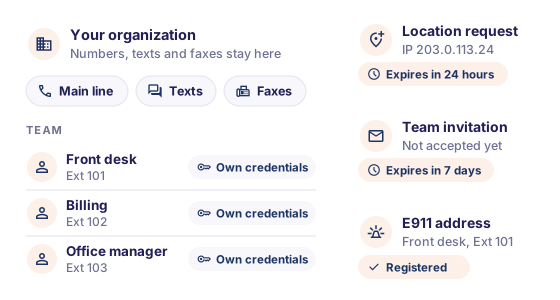
Every extension has its own credentials. Invitations and new-location requests have a time limit.
Credentials for every extension
Each extension has its own credentials, including for calls placed from the browser. There is no shared team login to pass around.
New offices connect by request
Connecting your phone system from a new office starts with a request in the app for that office's public IP address. Requests expire after 24 hours.
Invitations that expire
Team invitations last seven days. A forgotten invitation closes on its own.
An emergency address for every extension
Responders need to know where a call is coming from. Each extension's E911 address is registered and managed in PBXflex, next to your numbers. When someone moves desks or offices, you update it in the same place.
Texting the way carriers require
Carriers require business texts from a standard number to run on a registered 10DLC campaign. Without one, your texts can be filtered as spam.
A registered campaign on every plan
Every plan includes a low-volume 10DLC campaign, and guided setup registers it for you.
Sending paced to your campaign
Messages are paced to your campaign's limits, which reduces carrier rejections on larger sends.
STOP and HELP, handled
STOP and HELP replies are set once for the whole organization, so opt-outs are honored without anyone on your team having to remember.
Spam checks on incoming numbers
Incoming numbers are checked for spam signals before they reach your team.
Your data, and what we do with it
We protect it, we don't sell it, and the documents that set out our obligations are public.
No system is completely secure, and we will not pretend otherwise. Everything on this page describes how PBXflex works today.
Last updated
Safeguards, including encryption
We use administrative, technical and physical safeguards designed to protect your information, including encryption and secure infrastructure practices.
We don't sell personal information
Our privacy policy says so, and we are bound by it.
A Data Processing Agreement
It sets out how we process data on your behalf. A separate schedule lists the third-party services we may use to provide PBXflex.
Ongoing hardening and monitoring
We keep hardening the platform and have expanded our monitoring, so problems are caught and fixed sooner.
Documents for your vendor file
Four habits for your office
PBXflex does its part. These four are yours.
Remove people the day they leave
Their conversations stay in your organization for the rest of the team.
Keep patient and client texts on the business number
Ask staff to reply from the shared inbox, not from their own phones.
Keep credentials with their owner
Don't share an extension's credentials to cover a shift. Ring groups, queues and shared inboxes do that job.
Update emergency addresses when people move
When someone changes desks or offices, update their extension's E911 address in PBXflex.
Reviewing PBXflex for your organization
If you need a signed agreement, a security questionnaire answered or details of our controls for your vendor records, talk to us before you sign up. We will tell you exactly where we stand.
Or call (877) 575 - 9527
Report a security issue
If you believe you have found a vulnerability in PBXflex, email us with "Security" in the subject. Please test only against your own account, give us a reasonable chance to fix the issue before you share it, and include enough detail for us to reproduce it.
Thank you for telling us.
legal@pbxflex.comSecurity questions, answered
Is PBXflex secure?
Every number, conversation and fax in PBXflex belongs to one organization, and each extension has its own credentials. Your information is protected by administrative, technical and physical safeguards, including encryption. No system is completely secure, and we will not claim otherwise.
What happens to our texts when an employee leaves?
They stay with your business. On PBXflex, texts live in shared inboxes on your business numbers, and every conversation belongs to your organization, not to one person. Remove the user, and the rest of the team keeps the history.
Can another organization use our numbers or see our messages?
No. In PBXflex, every phone number, conversation and fax belongs to one organization, and access checks keep each number usable only inside it.
Do you sell our data?
No. PBXflex does not sell personal information, and our privacy policy says so.
Is our information encrypted?
Encryption is part of how PBXflex protects your information. Our privacy policy lists it among the administrative, technical and physical safeguards we use. If your review needs more detail, talk to our sales team before you sign up.
Do we need to register before we can send business texts?
Yes. Carriers require business texts from a standard number to run on a registered 10DLC campaign. Every PBXflex plan includes a low-volume campaign, and guided setup registers it for you.
How does E911 work on PBXflex?
Each PBXflex extension has its own E911 emergency address, registered and managed in the app next to your numbers. When someone moves desks or offices, update their address in the same place.
Can you complete our security questionnaire?
Talk to our sales team before you sign up. If you need a signed agreement, a questionnaire answered or details of our controls, we will tell you exactly where we stand.
Move patient and client texts off personal phones
Create your account and bring your numbers over for free. Your team calls, texts and faxes from the business, on desk phones, the web and mobile. No contract.
Questions first? Call (877) 575 - 9527